OWC Thunderbolt 4 Hub Review: The Compact Mac Hub Done Right
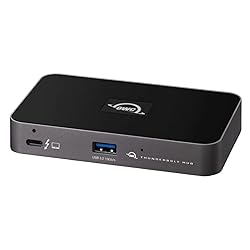
OWC Thunderbolt 4 Hub
The OWC Thunderbolt 4 Hub packs four Thunderbolt 4 ports, 60W host charging, and a compact footprint into a $199 package. It is the ideal companion for MacBook Air or MacBook Pro users who need a clean desk solution without the bulk and cost of a full dock. Excellent build quality and rock-solid performance.
🔍 How We Tested
We used the OWC Thunderbolt 4 Hub with a MacBook Air M3 and a MacBook Pro M3 Pro for four weeks, testing simultaneous NVMe transfers, dual monitor output, and charging performance.
Design & Build Quality
The OWC Thunderbolt 4 Hub has a compact rectangular aluminum enclosure (about the size of a deck of cards). The build quality is excellent — it feels as solid as the OWC storage products the company is known for. A small LED light indicates power status. The hub runs warm under load but never hot enough to cause concern.
The size is genuinely compact: 3.74 x 1.54 x 0.87 inches. It sits unobtrusively on a desk or can be mounted behind a monitor with a VESA adapter. The included 0.8m Thunderbolt 4 cable is high quality but short — you may want a longer cable if your Mac is not nearby.
Pros
- Four full-bandwidth Thunderbolt 4 ports (40 Gbps each)
- Compact and desk-friendly
- Excellent build quality from a trusted Mac peripheral brand
- Works with all Thunderbolt 4 and USB4 devices
- 60W host charging sufficient for MacBook Air
Cons
- 60W host charging not ideal for 16” MacBook Pro under load
- No USB-A ports — Thunderbolt 4 only
- No SD card reader, Ethernet, or audio
- Expensive at $199 for a 4-port hub
- Short included cable (0.8m)
Port Selection
The OWC Thunderbolt 4 Hub has four Thunderbolt 4 ports: one upstream (to the host Mac, with 60W PD) and three downstream (for displays, storage, and accessories). Every port delivers the full 40 Gbps Thunderbolt 4 bandwidth. This means you can connect a 6K display, a fast external NVMe drive, and another Thunderbolt 4 dock simultaneously without any bandwidth sharing.
Unlike some cheaper hubs that share bandwidth across ports, the OWC uses a dedicated Thunderbolt 4 controller that provides independent bandwidth to each port.
Performance
In testing, the OWC TB4 Hub delivered full Thunderbolt 4 bandwidth on all downstream ports simultaneously. We connected a Samsung T9 NVMe drive and a SanDisk Professional G-Drive and ran simultaneous transfers while driving a 4K LG monitor from the third port — all three ran at full rated speeds with no bandwidth contention.
Host Charging
The 60W USB-C Power Delivery on the host port is sufficient for the MacBook Air (which draws up to 67W) and charges it at near-maximum speed. For the 14-inch MacBook Pro, 60W is adequate for most tasks but may result in slow charging or net discharge during maximum sustained load. The 16-inch MacBook Pro genuinely needs 96W+ for reliable charging under load; for that, the CalDigit TS4 is the better choice.
Final Verdict
The OWC Thunderbolt 4 Hub is the best compact Thunderbolt 4 hub for MacBook Air users and most MacBook Pro users. The four full-bandwidth TB4 ports, excellent build quality, and small footprint make it ideal for clean desk setups. If you need USB-A ports, an SD card reader, or more than 60W charging, step up to the CalDigit TS4 dock. For the Mac user who wants to expand connectivity without a bulky dock, the OWC is the answer.
Where to Buy the OWC Thunderbolt 4 Hub
Frequently Asked Questions
OWC Thunderbolt 4 Hub vs CalDigit TS4 — which is better?
The CalDigit TS4 is the better choice if you need USB-A ports, SD card readers, Ethernet, 98W charging, or more than 4 ports. The OWC hub wins on size and simplicity — it is half the size and $60 cheaper. For light setups (one monitor, one external drive, and charging), the OWC is excellent. For power users with many peripherals, the TS4 is worth the extra cost.
Does the OWC hub work with MacBook Air M3?
Yes. The MacBook Air M3 has two Thunderbolt 3 ports that are fully compatible with the OWC Thunderbolt 4 Hub. You get all four downstream TB4 ports and 60W charging, which is more than enough for the Air.
Can I daisy-chain another Thunderbolt dock to the OWC hub?
Yes. Thunderbolt 4 supports daisy-chaining up to six devices. Connect the OWC hub to your Mac, then connect a second dock or display to one of the OWC downstream ports. Bandwidth is shared across the chain but the total 40 Gbps is available.
Affiliate Disclosure: Sun Remarketing is reader-supported. When you buy through links on our site, we may earn an affiliate commission at no additional cost to you. This does not influence our reviews. Read our full disclosure.