Quick Picks — Best iPad Air Cases
Contents

Apple Smart Folio — iPad Air 11" (M2/M3/M4)
Apple's own case for the iPad Air 11" is the benchmark everything else is measured against. Magnetically attached front and back, it snaps on perfectly flush — no gaps, no misalignment. Auto sleep/wake works instantly. At 41g it's featherlight, and it folds into two stand angles for typing and viewing. If your iPad Air mostly lives in a bag or on a desk and drop protection isn't a concern, this is the smartest choice.
Pros
- Engineered specifically for iPad Air 11" — perfect fit
- Auto sleep/wake via magnets
- Softest interior won't scratch the display
- Thinnest case available for this iPad
- Available in multiple colors
Cons
- Zero drop protection — corners fully exposed
- Only two stand angles
- $79 is expensive for a folio cover
- Stands can fold if bumped

Zugu Case — iPad Air 11"
The Zugu is the case iPad power users actually buy after their Apple Folio wears out. Ten adjustable stand angles — versus Apple's two — means you can prop the iPad Air in exactly the position you need whether you're cooking, presenting, or watching video on a plane. The magnetic back strap physically holds your Apple Pencil Pro when not in use (Apple's folio doesn't do this), and the reinforced corners give real drop protection. At $69.99, it's actually cheaper than the Apple Smart Folio while doing more.
Pros
- 10 stand angles — most versatile on this list
- Physical Apple Pencil Pro holder on back
- Corner drop protection included
- Costs less than Apple's own Smart Folio
- Magnetic auto sleep/wake
Cons
- Bulkier than the Apple Folio
- Back is enclosed — you can't remove it like a folio cover
- Heavier than slim-case options

OtterBox Defender Series — iPad Air 11" (M2/M3)
Some iPad Air cases offer drop protection. The OtterBox Defender is built around it. MIL-STD-810G tested, multi-layer polycarbonate shell, built-in screen protector, and port covers that seal out dust and debris. Yes, it's significantly bulkier than anything else on this list — that's exactly the point. This is the case for job sites, kids who treat tablets like frisbees, and anyone whose iPad Air genuinely needs to survive real abuse.
Pros
- MIL-STD-810G military-grade drop protection
- Built-in screen protector shields the display
- Port covers block dust and debris
- Three-layer construction absorbs impacts
- OtterBox lifetime warranty
Cons
- Bulkiest case on this list by a wide margin
- Screen protector can reduce touch sensitivity slightly
- No integrated stand — you need a separate stand
- Heaviest option here
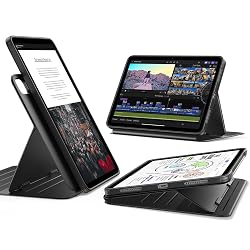
ESR Rebound 360 — iPad Air 11" (M2/M3/M4)
At $29.99, the ESR Rebound 360 packs in more features than cases costing twice as much. Nine adjustable stand angles (portrait and landscape), a removable magnetic front cover, Apple Pencil Pro holder, and auto sleep/wake — all for under $30. The build quality doesn't feel cheap either; ESR uses a durable polycarbonate back with a textured grip. If you want Zugu-like versatility without the Zugu price, this is the pick.
Pros
- 9 stand angles at a fraction of Zugu's price
- Removable magnetic cover (use with or without front cover)
- Apple Pencil Pro holder included
- Auto sleep/wake works reliably
- Compatible with M4/M3/M2 and older iPad Air
Cons
- Build quality isn't quite at Zugu or Apple level
- Hinge mechanism feels slightly plastic-y
- Less drop protection than OtterBox
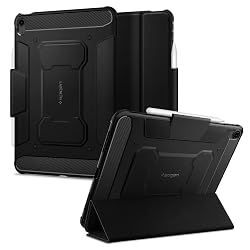
Spigen Rugged Armor Pro — iPad Air 11" (M2/M3)
Spigen's Rugged Armor Pro sits in a sweet spot that neither Apple's Smart Folio nor the OtterBox quite hits: real shock absorption with a slim, professional profile. The Air Cushion Technology corners absorb impact, the tri-fold cover folds into a stand, and there's a dedicated slot that holds your Apple Pencil Pro securely. Under $25, it's the best budget option for someone who wants genuine impact protection without bulk or eye-watering cost.
Pros
- Air Cushion corner protection at a low price
- Slim profile — doesn't add much bulk
- Dedicated Apple Pencil Pro holder (secure slot)
- Tri-fold stand cover included
- Under $25
Cons
- Only 2 stand angles (not as versatile as Zugu or ESR)
- No auto sleep/wake
- Less premium feel than Zugu or Apple cases
iPad Air Case Comparison Table
| Case | Drop Protection | Stand Angles | Pencil Holder | Auto Sleep/Wake | Price |
|---|---|---|---|---|---|
| Apple Smart Folio (Air 11") | None | 2 | No (charges only) | Yes | ~$79 |
| Zugu (Air 11") | Yes (corners) | 10 | Magnetic hold | Yes | ~$69.99 |
| OtterBox Defender (Air 11") | MIL-STD-810G | N/A | No | No | ~$89.95 |
| ESR Rebound 360 (Air 11") | Light | 9 | Yes (slot) | Yes | ~$29.99 |
| Spigen Rugged Armor Pro (Air 11") | Air Cushion corners | 2 | Yes (slot) | No | ~$24.99 |
iPad Air Case Buying Guide
Which iPad Air do you have? (It matters for fit)
The iPad Air 11" (M2, M3, M4) shares the same physical dimensions as the iPad Air 5th generation (10.9"), so many cases are labeled as compatible with all of these. The iPad Air 13" (M2, M3, M4) is a larger device with its own case ecosystem. All five cases on this page are for the iPad Air 11" unless otherwise noted.
Slim and stylish vs. genuine protection
The Apple Smart Folio looks great and adds almost nothing to the iPad's footprint — but drop it on a corner and there's nothing between your $599 iPad and the ground. If your iPad Air lives on your desk or in a padded bag, the Smart Folio is fine. If your kids use it, you travel with it frequently, or you work in environments where drops happen, step up to the Zugu or OtterBox Defender.
Stand angles actually matter more than you think
Apple's Smart Folio gives you two positions: reading angle and typing angle. That's fine for most uses. But if you cook with your iPad propped up in the kitchen, watch video at different distances, or use it for presentations, the Zugu's 10 angles and ESR's 9 angles make a real difference. You'll find yourself using your iPad in positions you never tried before.
Apple Pencil Pro: charging vs. holding
Every case on this list allows Apple Pencil Pro to charge magnetically on the iPad's side. But only the Zugu and ESR Rebound 360 physically hold the Pencil Pro with a magnetic band or slot — the Apple Smart Folio does not. If you frequently detach and reattach your Pencil Pro, the Zugu's magnetic holder is genuinely convenient.
Also consider: iPad Air 13" cases
If you have the larger iPad Air 13" (M2, M3, M4), the Zugu also makes an excellent case for that model. See our full iPad cases guide for more options covering the iPad Air 13" and iPad Pro.
Frequently Asked Questions
What is the best case for iPad Air 11"?
The best overall iPad Air 11" case depends on your use: the Apple Smart Folio for thinness and aesthetics, the Zugu for versatility and stand angles, and the OtterBox Defender for drop protection. For value, the ESR Rebound 360 gives you 9 stand angles and a Pencil holder for under $30.
Is the iPad Air 11" case the same as the iPad Air 5th generation?
Yes. The iPad Air 11" (M2, M3, M4) has the same 10.9" physical dimensions as the iPad Air 5th generation (2022), so cases labeled for either model are generally interchangeable. The ESR and Spigen cases on this page explicitly list compatibility with both the M2/M3 and the 5th/4th generation iPad Air.
Does the Smart Folio work with Apple Pencil Pro?
Yes — Apple Pencil Pro's magnetic charging strip on the iPad Air's side is fully accessible through the Smart Folio. However, the Smart Folio does not physically hold the Pencil Pro; it just doesn't block charging. If you want your Pencil Pro physically secured to the iPad when not in use, the Zugu and ESR Rebound 360 include dedicated holders.
Can I use a Magic Keyboard with an iPad Air case?
No — the Magic Keyboard for iPad Air attaches magnetically and works best without a back case. If you plan to use the Magic Keyboard, it serves as both a case and keyboard. Using a separate back case while attaching the Magic Keyboard is not practical and is not recommended.
What's the difference between iPad Air 11" and iPad Air 13" cases?
The iPad Air 11" and iPad Air 13" have different physical dimensions and require different cases. A case designed for the 11" will not fit the 13", and vice versa. If you have the 13" iPad Air, look for cases specifically labeled for iPad Air 13" M2/M3/M4. See our full iPad cases roundup for 13" options.