Apple HomePod (2nd Generation) Review: The Best Smart Speaker for Apple Users
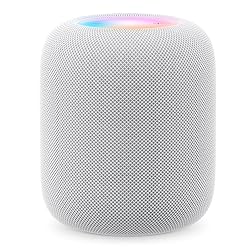
Apple HomePod (2nd Generation)
The second-generation HomePod delivers room-filling Spatial Audio with a deep, room-sensing bass response that genuinely outperforms speakers twice its size. The S9 chip enables on-device Siri with faster, more private processing. HomeKit and Matter integration make it the hub Apple's smart home has always needed. If you live in Apple's ecosystem, this is your speaker.
In This Review
🔍 How We Tested
We used the HomePod 2nd gen as a primary living room speaker for six weeks, testing with Apple Music Spatial Audio, Dolby Atmos movies via Apple TV, stereo pair configuration, HomeKit automation, and Siri accuracy across a range of queries. We also compared audio directly to a Sonos Era 100 and a previous-generation HomePod.
Design & Build
The second-generation HomePod is nearly identical in design to the original. The mesh fabric wraps a 4-inch high-excursion woofer and five tweeters arranged to beam sound in multiple directions simultaneously. Available in Midnight and White — both premium, subtle finishes that suit any decor. The illuminated touch surface on top responds to taps for play/pause and volume, and glows a white orb when Siri is active.
Setup is a single iPhone tap: hold your iPhone near the HomePod and the Home app handles everything in 30 seconds. No apps, no accounts, no configuration. It just works — which is a recurring theme with the HomePod.
Pros
- Room-filling Spatial Audio with automatic room sensing
- S9 chip with on-device Siri — faster and more private
- Thread and Matter support — smart home hub
- Temperature and humidity sensor built in
- Ultra-Wideband for precise iPhone handoff
- Setup in 30 seconds via iPhone
Cons
- $299 for a single speaker
- Apple ecosystem only — no Bluetooth audio for Android
- No Spotify direct play (AirPlay workaround)
- No stereo input jack or optical audio
Sound Quality
The HomePod 2nd gen sounds spectacular for its size. The computational audio system — driven by the S9 chip — continuously analyzes the music and the room's acoustic characteristics, adjusting the seven-driver array to direct sound optimally. Bass is deep and controlled without being bloomy. The high-frequency response is detailed without being harsh. Vocal clarity is excellent.
Spatial Audio for Apple Music content is the headline feature. Compatible tracks (Dolby Atmos) create a genuinely immersive soundscape that extends beyond the speaker's physical footprint. Not every track benefits equally, but orchestral and cinematic music sounds dramatically different — instruments occupy distinct positions in the room rather than emanating from a single point.
Siri & Smart Home Integration
The S9 chip processes many Siri requests entirely on-device, making them faster and more private. Timers, alarms, music control, HomeKit commands, and Apple Music requests all process locally. More complex queries (web searches, general knowledge, reminders) still go to Apple's servers but return quickly. Voice recognition is accurate — we had fewer false triggers than with previous HomePods.
As a HomeKit hub, the HomePod 2nd gen supports Thread (a low-power mesh networking protocol for smart home devices) and Matter (the cross-ecosystem smart home standard). This means it can control Philips Hue, Nanoleaf, Ecobee, August locks, and hundreds of other Matter-certified devices directly through the Home app. The HomePod can process HomeKit automations locally without internet access — your lights still turn on at sunset even if your router goes down.
| Spec | Apple HomePod (2nd Gen) |
|---|---|
| Chip | Apple S9 |
| Audio | 4” high-excursion woofer + 5 tweeters |
| Microphones | 6-microphone array with beamforming |
| Sensors | Temperature, humidity, Ultra-Wideband |
| Smart Home | HomeKit hub, Thread, Matter |
| Audio Sources | AirPlay 2, Siri, iPhone/Mac handoff |
| Colors | Midnight, White |
| Dimensions | 172 × 142mm |
| Weight | 2.3 kg |
| Price | $299 |
Stereo Pairing
Two HomePods can be paired into a stereo system that transforms the sound experience. When paired, the computational audio system assigns each speaker a dedicated stereo channel and uses the room-sensing technology to optimize channel separation for your listening position. The result is a wide, immersive soundstage that rivals dedicated stereo speaker systems costing $600 or more.
Paired HomePods also serve as Apple TV surrounds. Connect them to an Apple TV 4K and the pair automatically provides Home Theater Mode with Dolby Atmos, creating a genuinely cinematic home theater without a dedicated AV receiver. For $598 and an Apple TV 4K, it's the simplest high-quality home theater setup available.
HomePod vs HomePod mini
The HomePod mini ($99) is three times cheaper and fills small rooms well. The full HomePod is for larger rooms and people who prioritize audio quality. Key differences: the full HomePod has deeper bass, higher maximum volume, Spatial Audio processing, and temperature/humidity sensors. For a bedroom or kitchen, the mini is perfect value. For a living room or home office where you're listening while working, the full HomePod's sound quality justifies the premium.
Where to Buy the Apple HomePod 2nd Gen
Final Verdict
The Apple HomePod 2nd generation is the best smart speaker for Apple users — full stop. The sound quality is genuinely impressive, the smart home integration is the most seamless available, and setup is effortless if you have an iPhone. The $299 price is steep for a single speaker, and the Apple-only audio ecosystem is a real limitation. But if you're embedded in Apple's world, nothing else comes close.
Frequently Asked Questions
Can I use Spotify with HomePod?
Yes, but not directly. Spotify doesn't support AirPlay natively on HomePod. You play Spotify on your iPhone and use AirPlay to send it to the HomePod. It works well but lacks the always-listening Siri integration you get with Apple Music. Spotify Connect direct-to-HomePod is not currently supported.
Does HomePod work without iPhone?
After initial setup with an iPhone, the HomePod operates independently. You can control it with Siri voice commands, the Home app on any Apple device, or AirPlay from any Apple device on the same network. The temperature sensor and HomeKit automations run locally without any iPhone needed.
HomePod 2nd gen vs original HomePod — worth upgrading?
Yes. The S9 chip brings faster Siri processing, the temperature/humidity sensor adds utility, and Thread support future-proofs smart home compatibility. If your original HomePod is still working, it's not a critical upgrade — but the 2nd gen is meaningfully better. If buying new, always choose the 2nd gen.
Can HomePod serve as a Mac speaker?
Yes, via AirPlay. In macOS, select HomePod as your audio output in System Settings or the menu bar volume icon. The audio quality is excellent for music and podcasts. Video sync is good but has a slight latency that's occasionally noticeable with video playback. For primary Mac audio, it works well; just be aware of the wireless audio path.
Affiliate Disclosure: Sun Remarketing is reader-supported. When you buy through links on our site, we may earn an affiliate commission at no additional cost to you. Read our full disclosure.