MacBook Air M3 13-Inch Review: The Best Laptop for Most People
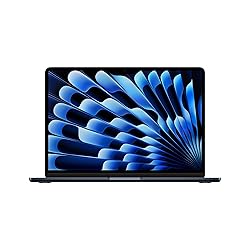
MacBook Air M3 13-Inch
Apple's M3 Air delivers all-day battery life, whisper-quiet fanless operation, and benchmark-crushing performance in a 2.7-lb chassis. At $1,099 it is the best thin-and-light laptop available for students, creatives, and remote workers alike.
In This Review
🔍 How We Tested
We ran the MacBook Air M3 (16GB RAM, 512GB SSD) as a daily driver for four weeks: Final Cut Pro exports, Xcode builds, Lightroom edits, 40-tab browser sessions. Battery tested at 70% brightness with Wi-Fi active.
Design & Build Quality
The MacBook Air M3 uses the squared-off aluminum chassis Apple introduced with the M2 generation, measuring 11.97mm thin and weighing just 1.24 kg. The all-aluminum enclosure feels solid with zero flex in the lid or keyboard deck. MagSafe 3 returns, freeing both Thunderbolt ports for peripherals. The 1080p FaceTime camera handles video calls well even in dim light.
Pros
- Exceptionally thin at 11.97mm, weighs 1.24 kg
- Completely silent — no fan under any workload
- MagSafe 3 frees both USB-C ports
- 1080p webcam with center stage
- 15–18 hrs battery life — best in class
Cons
- Only two Thunderbolt 3 ports (not TB4)
- No HDMI, no SD card slot, no USB-A
- Dual external displays only in clamshell mode
- 8GB base RAM feels limiting for power users
Display
The 13.6-inch Liquid Retina display (2560x1664, 224 ppi) peaks at 500 nits — 600 nits for HDR. It covers the P3 wide color gamut and supports 1 billion colors. True Tone adapts white balance automatically. It is an excellent panel for photo editing, video work, and everyday use.
The 60Hz refresh rate is the main limitation vs. the 14-inch MacBook Pro's 120Hz ProMotion display. Scrolling is noticeably less fluid side by side, though most users will not notice in isolation.
Performance & Benchmarks
Built on TSMC's 3nm process, the M3 chip scores approximately 3,000 single-core and 11,800 multi-core in Geekbench 6 — competing with premium Intel Core i9 laptops at a fraction of the power draw. In our tests: a 10-minute 4K ProRes export finished in 4 minutes; Xcode builds ran 35% faster than M1; Lightroom edits applied instantly.
Because the Air is fanless, sustained heavy workloads (long Handbrake encodes) will throttle slightly. For video editors running multi-hour renders, the actively cooled MacBook Pro M3 handles that better.
| Chip | CPU Cores | GPU Cores | RAM Options | Storage | Display | Battery | Weight |
|---|---|---|---|---|---|---|---|
| Apple M3 | 8-core | 10-core | 8GB / 16GB / 24GB | 256GB – 2TB SSD | 13.6” Liquid Retina | Up to 18 hrs | 1.24 kg (2.7 lbs) |
Battery Life
Apple rates the M3 Air at 18 hours. In our mixed-use tests (browsing, email, documents, video playback) we consistently saw 14–16 hours. Pure video playback hit 18 hours. This is the best battery life of any 13-inch laptop — on a full charge, you can work two full days without needing to plug in.
Ports & Connectivity
Two Thunderbolt 3 / USB-C ports (left), MagSafe 3, and a 3.5mm headphone jack. No HDMI, no SD card, no USB-A. A good USB-C hub solves this — see our best USB-C docks roundup. Wi-Fi 6E and Bluetooth 5.3 are included.
Final Verdict
The MacBook Air M3 is the best all-around laptop at its price. Thin, light, silent, fast, and with battery life that outlasts the competition by hours. The limited ports are real but a $50 hub fixes them.
Buy it if: You want the best thin-and-light, you are upgrading from an Intel Mac or M1 Air, or you need all-day battery with zero fan noise.
Consider the MacBook Pro M3 if: You need sustained performance for long renders, dual external displays with the lid open, or Thunderbolt 4 bandwidth.
Where to Buy the MacBook Air M3
Frequently Asked Questions
M3 vs M2 Air — worth upgrading?
If you have the M2 Air, the jump is modest (~20% faster in GPU tasks). From M1 or Intel, the M3 is a significant improvement. The M2 Air at a discount is also worth considering.
How much RAM should I configure?
16GB is our recommendation. 8GB works for light use, but Lightroom, heavy browser use, and long-term ownership all benefit from 16GB. RAM is soldered and cannot be upgraded later.
Can the M3 Air run two external monitors?
Yes, but only in clamshell mode (lid closed). With the lid open, it supports one external display. The M3 Pro chip supports two external displays with the lid open.
Affiliate Disclosure: Sun Remarketing is reader-supported. When you buy through links on our site, we may earn an affiliate commission at no additional cost to you. This does not influence our reviews. Read our full disclosure.