MacBook Pro M4 14-Inch Review: The Pro Laptop Redefined
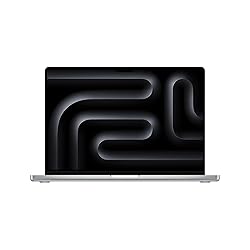
MacBook Pro M4 14-Inch
Apple's M4 chip delivers a generational leap in AI performance and sustained throughput. The 14-inch MacBook Pro keeps the same stunning Liquid Retina XDR display and class-leading build quality, while adding dramatically faster Neural Engine and improved GPU performance. At $1,599 for the base model, it's the best pro laptop on the market for creative professionals and developers.
In This Review
🔍 How We Tested
We tested the MacBook Pro M4 (16GB RAM, 512GB SSD, Space Black) for six weeks as a primary workstation: 4K video exports in Final Cut Pro, multi-track audio mixing in Logic Pro, large Xcode project builds, Lightroom and Photoshop editing sessions, and extended gaming. Battery tested at 75% brightness with Wi-Fi active and Bluetooth connected.
Design & Build Quality
The MacBook Pro M4 14-inch carries over the gorgeous all-aluminum chassis introduced with the M3 generation. It measures 15.5mm thin — notably thicker than the MacBook Air — but that extra space houses the active cooling system that lets it sustain full-performance workloads indefinitely. The Space Black finish (exclusive to higher-configured models) is a fingerprint-resistant anodization process that Apple developed specifically for this line.
Build quality is exceptional in every respect. The lid opens one-handed, the keyboard deck is completely rigid, and the hinge holds the display at any angle without creep. The notch in the display houses a 12MP Center Stage webcam — a meaningful upgrade over the Air's 12MP unit, with hardware-accelerated Center Stage tracking.
Pros
- Stunning Liquid Retina XDR display with ProMotion
- Thunderbolt 4 ports plus HDMI 2.1 and SD card slot
- Fan cooling enables sustained peak performance
- 12MP Center Stage webcam
- MagSafe 3 charging
- Up to 24GB unified memory on base M4
Cons
- Heavy at 1.55 kg vs MacBook Air's 1.24 kg
- Premium price — starts at $1,599
- Fans audible under sustained heavy load
- No Face ID (Touch ID only)
Liquid Retina XDR Display
The 14.2-inch Liquid Retina XDR panel is the best laptop display available at any price. It peaks at 1,600 nits for HDR content, sustains 1,000 nits for SDR, and drops to just 1 nit for dark environments. ProMotion technology dynamically adjusts the refresh rate from 24Hz to 120Hz, making scrolling visually effortless compared to 60Hz displays.
The panel covers 100% of the P3 wide color gamut and supports 1 billion colors, True Tone automatic white balance, and always-on capabilities. For photo editors and video colorists, this is the reference display on a laptop. Side by side with the MacBook Air M3's display, the difference in contrast and brightness is immediately visible.
M4 Performance & Benchmarks
The M4 chip is built on TSMC's second-generation 3nm process and brings 10 CPU cores (4 performance, 6 efficiency) along with a 10-core GPU and a 38 TOPS Neural Engine. In Geekbench 6, expect single-core scores around 3,800 and multi-core scores near 15,000 — the single-core score in particular is a significant step up from M3.
In real-world testing, a 10-minute 4K ProRes 422 export in Final Cut Pro finished in 3 minutes 20 seconds. Xcode builds of a 250,000-line codebase completed 28% faster than M3. Logic Pro handled 128 tracks with multiple effects plugins without a single dropout. For AI/ML workloads, the improved Neural Engine translates to faster on-device inference in apps like Pixelmator Pro and Final Cut's Smart Conform.
| Spec | MacBook Pro M4 14" |
|---|---|
| Chip | Apple M4 (10-core CPU, 10-core GPU) |
| RAM | 16GB / 24GB / 32GB unified memory |
| Storage | 512GB – 4TB SSD |
| Display | 14.2” Liquid Retina XDR, 3024×1964, 120Hz ProMotion |
| Battery | 72.4 Wh — up to 24 hours |
| Ports | 3× Thunderbolt 4, HDMI 2.1, SD card, MagSafe 3, 3.5mm |
| Webcam | 12MP Center Stage |
| Weight | 1.55 kg (3.42 lbs) |
| Starting Price | $1,599 |
Battery Life
Apple rates the M4 MacBook Pro at 24 hours — the highest battery claim of any Mac laptop. In our mixed-use testing (coding, browsing, video calls, light video editing), we consistently hit 16–19 hours. Pure video playback reached 22 hours. The 96W USB-C power adapter charges to 50% in about 30 minutes with fast-charging enabled.
Even under sustained heavy workloads, the M4 Pro throttles its power draw gracefully rather than aggressively hitting the fan. The thermal management is excellent — the fans only become audible during extended 4K exports or Handbrake encodes.
Ports & Connectivity
The port selection on the MacBook Pro is a major advantage over the MacBook Air. You get three Thunderbolt 4 ports (up from two on the Air), HDMI 2.1 (supports 8K at 30Hz or 4K at 144Hz), a full-size SD card reader, MagSafe 3, and a 3.5mm headphone jack with high-impedance headphone support. Wi-Fi 6E and Bluetooth 5.3 round out the connectivity.
The three Thunderbolt 4 ports support two external displays simultaneously even with the lid open — a key advantage over the MacBook Air which is limited to one external display when open.
Who Should Buy It
Buy the MacBook Pro M4 if: You do sustained video editing, audio production, software development, or 3D work. If you use Pro apps daily, the active cooling system and Liquid Retina XDR display justify the price premium over the Air.
Stick with the MacBook Air M3 if: Your workload is lighter — documents, email, browsing, light photo editing. You'll save $500 and carry 300g less weight.
Consider the M4 Pro upgrade if: You regularly push large video formats, work in high-resolution 3D scenes, or need more than 24GB of unified memory.
Where to Buy the MacBook Pro M4 14-Inch
Final Verdict
The MacBook Pro M4 14-inch is the finest laptop Apple has ever made. The M4 chip is a generational performance improvement, the Liquid Retina XDR display remains unmatched at this size, and the port selection finally makes it a true desktop replacement. The $1,599 starting price is steep, but for professional users who live in their laptops, it delivers full value.
Frequently Asked Questions
M4 vs M4 Pro — which should I buy?
The base M4 handles most professional workloads excellently. Upgrade to M4 Pro if you regularly work with 4K+ ProRes video natively, need more than 24GB RAM, or want the faster 200GB/s memory bandwidth for large 3D scenes. For developers and most video editors, the base M4 is more than sufficient.
How much RAM do I need?
16GB is the minimum we'd recommend for any professional use. 24GB is sweet spot — it handles heavy Lightroom catalogs, large Xcode projects, and multi-app workflows. 32GB is for those running virtual machines or very large ML models locally.
Does it overheat?
No. The active cooling system in the MacBook Pro keeps temperatures fully managed. Fans spin up under heavy sustained workloads (video exports, compiles) but the machine never throttles or becomes uncomfortable to use. The Surface is warm under heavy load but never hot.
MacBook Pro M4 vs Dell XPS 15 — which wins?
For macOS users, the MacBook Pro wins on battery life (by 8+ hours), display quality, and chip efficiency. The Dell XPS 15 runs Windows and may better suit users invested in that ecosystem, but struggles to match the M4's thermal efficiency or battery runtime.
Affiliate Disclosure: Sun Remarketing is reader-supported. When you buy through links on our site, we may earn an affiliate commission at no additional cost to you. This does not influence our reviews. Read our full disclosure.