Dell U2724D 27" 4K Monitor Review: The Best Mac Monitor Under $600
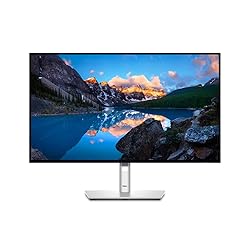
Dell U2724D 27" 4K USB-C Monitor
Dell's U2724D uses the newer IPS Black panel technology to deliver 2000:1 contrast — double that of standard IPS — while maintaining the excellent color accuracy and wide viewing angles IPS is known for. Add 90W USB-C Power Delivery, a built-in USB hub, and factory calibration to Delta E < 2, and you have the most complete single-cable Mac monitor under $600.
In This Review
🔍 How We Tested
We used the Dell U2724D as a primary display with a MacBook Pro M4 for four weeks. Color accuracy measured with a Calibrite ColorChecker Display Pro. We compared the IPS Black panel directly against a standard IPS panel (LG 27UN850-W) in a side-by-side setup for contrast and black level evaluation.
Design & Ergonomics
The U2724D has Dell's signature ultrasharp aesthetic: thin bezels on three sides, matte anti-glare coating, and a sturdy arm stand with full height, tilt, swivel, and pivot adjustment. The stand holds position firmly without drift. The monitor can pivot 90 degrees to portrait mode — useful for code review or document editing. Cable management channels in the stand keep the desk clean.
The build feels premium without being flashy. At 5.7kg with the stand, it's solid rather than heavy. The OSD controls use a joystick at the rear — far easier to navigate than the button arrays on competing monitors.
Pros
- IPS Black panel: 2000:1 contrast (double standard IPS)
- 90W USB-C PD charges MacBook Pro at full wattage
- Factory calibrated to Delta E < 2
- Full ergonomic adjustment: height, tilt, swivel, pivot
- Built-in 4-port USB hub (3× USB-A, 1× USB-C)
- 3-year Advanced Exchange warranty
Cons
- 60Hz only — no high refresh rate option
- No HDR600 certification
- ~$549 is more expensive than basic 4K monitors
- Glossy finish not available
IPS Black Display Quality
The U2724D's headline feature is its IPS Black panel, which achieves a 2000:1 contrast ratio — significantly better than the 1000:1 of standard IPS panels like the LG 27UN850-W. In practice, this means darker blacks and more shadow detail in dark content. Side by side with a standard IPS monitor, the difference is visible but not as dramatic as the spec gap suggests — you're looking at a very dark gray vs. black, not true OLED-level blacks.
Color accuracy is excellent. Our Calibrite measurements confirmed the factory calibration claims: Delta E average of 1.4 out of the box, covering 99% of sRGB and 95% of DCI-P3. For photographers and designers who need accurate color without paying for a color-calibration device, the U2724D delivers. The 400-nit peak brightness is comfortable for both bright and dim environments.
Connectivity & USB-C Hub
The U2724D is a genuine single-cable solution for Mac users. One Thunderbolt 4 or USB-C cable from your MacBook carries 4K video signal, 90W power delivery (enough to charge a MacBook Pro 14-inch at full wattage while working), and high-speed data to the monitor's USB hub. The hub provides three USB-A 3.2 ports and one downstream USB-C port, turning the monitor into a mini dock.
Additional ports: HDMI 2.0 (4K@60Hz), DisplayPort 1.4, RJ-45 Ethernet. The Ethernet is particularly useful for wired internet in a home office — one cable to the monitor gives you both 4K display and gigabit network access. Audio out (3.5mm) rounds out the rear panel.
| Spec | Dell U2724D |
|---|---|
| Panel | IPS Black |
| Size | 27-inch |
| Resolution | 3840×2160 (4K UHD) |
| Refresh Rate | 60Hz |
| Contrast | 2000:1 (IPS Black) |
| Brightness | 400 nits typical |
| Color Coverage | 99% sRGB, 95% DCI-P3 |
| USB-C Power Delivery | 90W |
| Ports | USB-C 90W, HDMI 2.0, DP 1.4, 3×USB-A, USB-C, RJ-45 |
| Warranty | 3-year Advanced Exchange |
| Price | ~$549 |
Mac Compatibility
Plug a USB-C cable from your MacBook's Thunderbolt port into the U2724D and macOS instantly recognizes it as a 4K display at 60Hz. No drivers, no configuration, no adapter needed. HiDPI (Retina) scaling modes are fully available at the native 4K resolution, and the default "looks like 2560x1440" scaling renders text at exactly the pixel density MacBook Pro users expect.
True Tone doesn't work on external monitors, but the U2724D's color temperature options allow you to dial in a warm or neutral white point to match your preference. Night Shift in macOS applies globally and works with any external monitor including this one.
Dell U2724D vs LG 27UN850-W
We also reviewed the LG 27UN850-W and use both monitors regularly. Here's the honest comparison:
- Contrast: Dell wins clearly. IPS Black 2000:1 vs LG's standard 1000:1. Dark scenes look noticeably better on the Dell.
- Color accuracy: Tied. Both are factory-calibrated to Delta E < 2 and cover 95%+ DCI-P3.
- USB-C power: Dell delivers 90W vs LG's 60W. The Dell can charge a MacBook Pro 14-inch at full speed; the LG may cause battery drain under heavy use.
- Design: LG has a slimmer profile. Dell has better ergonomics and a more adjustable stand.
- Price: Roughly equivalent in the $500–$600 range. The Dell's IPS Black and higher USB-C wattage make it the better value.
Where to Buy the Dell U2724D
Final Verdict
The Dell U2724D is the monitor we recommend most often to Mac users who want a single-cable 4K display without spending $1,600 on Apple's Pro Display XDR. The IPS Black panel's improved contrast, factory color accuracy, 90W USB-C charging, and built-in USB hub cover every base. If the 60Hz refresh rate bothers you for gaming, look elsewhere. For professional work, it's the best value monitor for Mac in this price range.
Frequently Asked Questions
Does 90W USB-C charge MacBook Pro 16-inch?
The MacBook Pro 16-inch draws up to 140W under full load. At 90W, the monitor will charge the laptop at rest or light use, but the battery may slowly drain during sustained heavy workloads. For sustained heavy work on a 16-inch, use the included 140W MagSafe adapter and connect the monitor via HDMI or DisplayPort.
Can I use this with a Mac mini?
Yes. Connect via the included USB-C cable or use HDMI 2.0 or DisplayPort 1.4. The USB hub and Ethernet are powered regardless of how you connect the display signal, so they're always available as long as one USB-C cable is connected for data even if you use HDMI for video.
Is IPS Black worth the premium over standard IPS?
For mixed-use work that includes watching video, viewing photos, or working in dark-themed apps, yes. The improved contrast makes a genuine visual difference. For spreadsheets and documents in bright environments, you likely won't notice. Our recommendation: if you ever watch movies or edit photos on your monitor, the IPS Black upgrade is worth it.
Does this monitor support ProMotion / 120Hz with Mac?
No — the U2724D is a 60Hz monitor. Apple's ProMotion external display support requires a compatible monitor (like the LG UltraFine 5K or Pro Display XDR) and works via Thunderbolt. For 120Hz external display support, you'd need to look at gaming monitors with DisplayPort 1.4 and a compatible Mac.
Affiliate Disclosure: Sun Remarketing is reader-supported. When you buy through links on our site, we may earn an affiliate commission at no additional cost to you. Read our full disclosure.
Read Next
Related: Pair this monitor with the right setup — see our Best Mac Desk Setup Guide for monitor arms, lighting, and accessories that complement the U2724D.