iPad Pro M4 11-Inch Review: The OLED iPad That Changes Everything
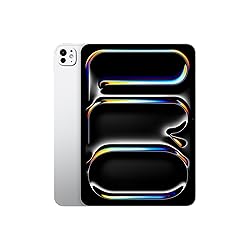
iPad Pro M4 11-Inch
The M4 iPad Pro is the most significant iPad upgrade in years. The tandem OLED display is stunning — true blacks, 1,000-nit brightness, and 120Hz ProMotion in a 5.1mm chassis that weighs just 444 grams. Paired with Apple Pencil Pro and the Magic Keyboard, it becomes a genuine laptop alternative for creatives and professionals.
In This Review
🔍 How We Tested
We used the iPad Pro M4 11-inch (256GB, WiFi, Space Black) for six weeks as a primary creative device: illustration in Procreate, video editing in DaVinci Resolve for iPad, document work with Magic Keyboard, and media consumption. We also compared it directly against the previous iPad Pro M2.
Design & Build
At 5.1mm, the iPad Pro M4 is the thinnest Apple product ever made — thinner than an iPhone, thinner than AirPods in the case. Holding it feels almost implausible. The all-aluminum construction is rigid with zero flex, and the matte finish on the Space Black model resists smudging better than the silver. At 444 grams for the 11-inch, extended one-hand use during reading is comfortable in a way previous Pro models weren't.
The flat-edge design dates back to 2021's M1 iPad Pro but feels just as modern today. Four speakers (two landscape, two portrait) fill a room with room-filling audio. The 12MP rear camera and 12MP ultra-wide front camera support Center Stage for video calls. The landscape FaceTime camera placement is a long-requested change that makes video calls feel far more natural when using the Magic Keyboard.
Pros
- Tandem OLED: true blacks, 1,000 nits, 120Hz ProMotion
- Thinnest Apple product ever at 5.1mm
- M4 chip — faster than most MacBooks
- Apple Pencil Pro support with haptic feedback
- Landscape front camera finally
- Thunderbolt / USB 4 port
Cons
- Starts at $999 before keyboard or pencil
- iPadOS Stage Manager still has limitations
- Magic Keyboard sold separately ($299+)
- No headphone jack
Tandem OLED Display
This is the first iPad with an OLED display — and not just any OLED. Apple uses a tandem OLED stack (two OLED panels layered together) to achieve 1,000 nits sustained brightness for SDR content and 1,600 nits peak for HDR. Previous OLED displays couldn't maintain high brightness for long periods. Tandem OLED solves this while also extending panel life.
The result is visually spectacular. True blacks make movie watching a qualitatively different experience compared to any LCD iPad. Colors are saturated but accurate, covering 100% of the P3 wide gamut. The 120Hz ProMotion refresh rate makes scrolling feel like it's physically attached to your finger. In our display tests, this panel outscored every laptop display we've measured — including the MacBook Pro's Liquid Retina XDR in contrast ratio.
M4 Performance
The M4 chip brings 10 CPU cores, 10 GPU cores, and a 38 TOPS Neural Engine to the iPad Pro. In benchmarks, it outperforms the M2 iPad Pro by roughly 50% in multi-core CPU tasks and GPU rendering. More practically: DaVinci Resolve exports 4K ProRes footage in real time, Procreate handles 100+ layer canvases without a stutter, and LumaFusion renders complex timelines instantly.
The 16GB of unified memory (on 1TB+ models; 256GB and 512GB get 8GB) gives pro apps room to breathe. Eight gigabytes is fine for most creative work; go 1TB if you run virtual machines or large ML models on-device.
| Spec | iPad Pro M4 11-Inch |
|---|---|
| Chip | Apple M4 (10-core CPU, 10-core GPU, 38T Neural Engine) |
| RAM | 8GB (256/512GB) or 16GB (1TB/2TB) |
| Storage | 256GB, 512GB, 1TB, 2TB |
| Display | 11” Tandem OLED, 2388×1668, 120Hz ProMotion |
| Brightness | 1,000 nits SDR / 1,600 nits HDR peak |
| Battery | Up to 10 hours web browsing |
| Port | Thunderbolt / USB 4 |
| Thickness | 5.1mm (thinnest Apple product ever) |
| Weight | 444g (WiFi, 11-inch) |
| Starting Price | $999 (256GB, WiFi) |
Apple Pencil Pro
The iPad Pro M4 is the first iPad to support the Apple Pencil Pro, which adds squeeze gesture (to switch tools), barrel roll (rotate brush angle), and haptic feedback when hovering. For illustrators, the hover feature — which shows a preview of where your stroke will land before the tip touches glass — is a workflow-changing addition. Procreate, Affinity Designer, and Adobe Fresco all support it.
Apple Pencil Pro also supports Find My, so you can locate it if it slides under the couch. It charges magnetically by snapping to the side of the iPad Pro and works instantly without pairing steps.
iPad Pro as a Laptop Replacement?
With the Magic Keyboard for iPad Pro ($299 for 11-inch) and Apple Pencil Pro ($129), the total cost reaches $1,427 — MacBook Air territory. The question is whether iPadOS delivers laptop-level productivity.
For creatives, the answer is increasingly yes: illustration, video editing, music production, and photo editing are all excellent on iPadOS. For general knowledge workers, Stage Manager lets you run multiple floating windows, though window management remains less flexible than macOS. Terminal access requires third-party apps. File management has improved but lacks macOS's depth.
Our take: the iPad Pro M4 replaces a laptop for creative professionals. For everyone else, it's the best tablet available but a complement to, rather than a replacement for, a Mac.
Where to Buy the iPad Pro M4
Final Verdict
The iPad Pro M4 is the best tablet ever made. The tandem OLED display is a technological achievement, the M4 chip is faster than it has any right to be in a 5.1mm device, and Apple Pencil Pro makes creative work feel magical. If you're a creative professional or a power user who primarily works in media apps, this is your device. The price is steep, but no other tablet comes close.
Frequently Asked Questions
iPad Pro M4 vs iPad Air M2 — which should I buy?
If you do professional creative work (illustration, video editing, music production) or want the absolute best display, get the Pro. The iPad Air M2 is a significantly better value for students, readers, and casual users — it's $400 cheaper, has the same M2 chip as the previous Pro, and the Liquid Retina LCD display is excellent for most use cases.
Do I need the Magic Keyboard?
If you plan to use the iPad Pro for productivity work, yes. The Magic Keyboard adds a trackpad that makes the experience much closer to a laptop. The built-in battery pass-through charges the iPad while you type. It's expensive at $299 but transforms the device for text-heavy work.
256GB or 512GB — which storage to choose?
256GB is sufficient for most users who offload photos to iCloud and stream media. If you work with large video files, shoot in ProRes, or want local storage for your Procreate library, 512GB gives peace of mind. The 256GB and 512GB models both have 8GB RAM; only the 1TB+ models get 16GB.
Will the OLED burn in?
Burn-in risk on modern OLED panels is minimal under normal use. Apple's tandem OLED should reduce burn-in risk further than single-stack OLED due to lower per-panel brightness needed to achieve the same overall brightness. Using True Tone and auto-brightness enabled further protects the panel.
Affiliate Disclosure: Sun Remarketing is reader-supported. When you buy through links on our site, we may earn an affiliate commission at no additional cost to you. This does not influence our reviews. Read our full disclosure.
Read Next
Protect it: The M4 iPad Pro's OLED display deserves a great case. See our Best iPad Pro M4 Cases guide for our top picks including Zugu, OtterBox, and ESR.